MackDown↓

Markdown, turned on its head.

A Markdown viewer for Windows that opens before you've finished double-clicking. Three megabytes. No browser inside. No account. No sidebar that wants to be your friend.

⬇ Download for Windows Source on GitHub

Latest release: …

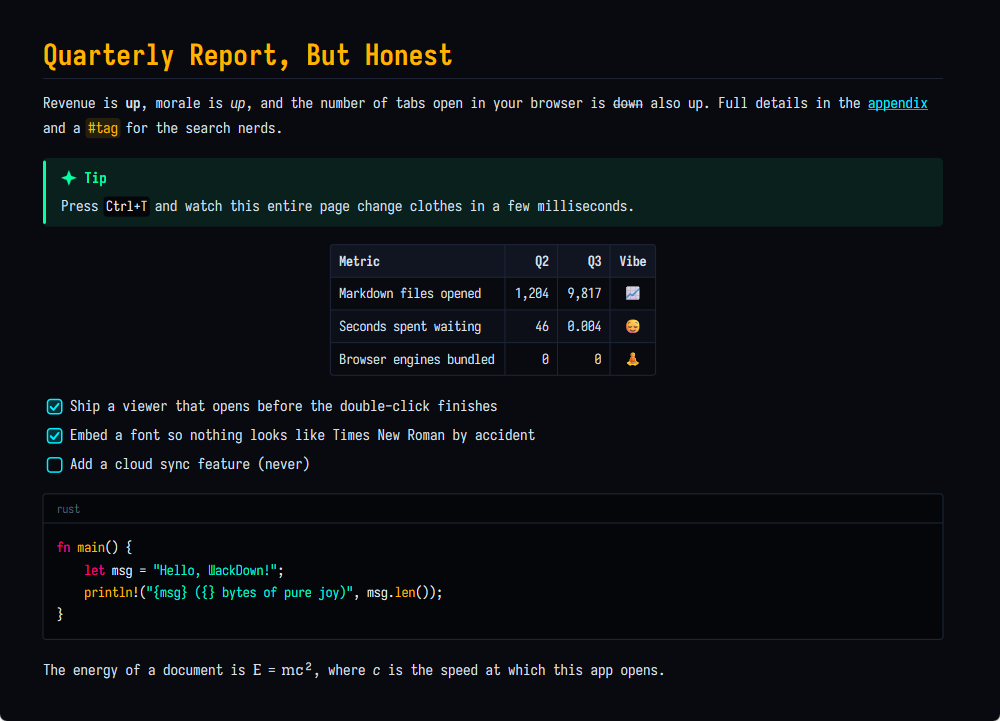
hero.md — ƜackDown · Cyberpunk Terminal
ƜackDown showing a Markdown document in the Cyberpunk Terminal theme

Nutrition Facts

Serving size1 .md file
Download size~3 MB
Browser engines0
Background services0
Accounts required0
Telemetry0 g
Fonts, embedded3 cuts
Themes6
Percent daily values are based on a 2,000-tab diet. Contains Rust. Processed on GPUs that also process games.

#A short history of opening a text file

Times for other apps are from memory and mild resentment, not benchmarks. The 2 ms figure is from our own test suite on an ordinary desktop. Your mileage may vary; it will still be short.

#Things ƜackDown will never do

A feature list, but for the features we're proudest of not having.

#What it does instead

Opens huge files instantly

It lays out only what fits on your screen before the window appears, and does the rest a few milliseconds at a time while you read. The scrollbar politely estimates the length until it knows.

Draws with the GPU, not a browser

Direct2D and DirectWrite, straight from Rust. Every frame is timed to your monitor's refresh rate, so scrolling and zooming feel like they belong to the OS, because they do.

Six themes, zero CSS

Cyberpunk Terminal, Tokyo Dusk, Monokai Pro Rust, Nordic Fjord, Solarized Deep Dark and Paper & Gutenberg. Each pairs its own body, heading and code fonts. Write your own in a few lines of JSON.

Brings its own typeface

Iosevka, in monospace, sans and serif cuts, embedded in the exe. Your documents look the same on every machine, including the one where somebody uninstalled the fonts.

Reloads when you save

Keep your real editor open next to it. Hit save, and ƜackDown has already redrawn by the time you look over. No "file changed on disk" dialog, because what else would you want?

Code blocks that respect identifiers

Long lines scroll sideways instead of wrapping in the middle of Api.Integrators. Syntax colors for a dozen languages. A Copy button appears when you hover, then goes away again.

Math, within reason

TeX becomes Unicode: $E = mc^2$ renders as E = mc², \alpha \leq \beta as α ≤ β. Matrices and other things Unicode can't say are shown as source, honestly, instead of wrong.

The extensions people actually use

Tables, task lists, footnotes that link both ways, callouts with real icons, definition lists, [[wiki links]], H~2~O, 2^10^, {#custom-ids}. Mermaid diagrams are shown as code. We're sorry. We're not that sorry.

Keyboard first

Everything is a key away: zoom, themes, back, select all, copy, a help page on F1. The mouse is welcome too. It just isn't required.

#Weight class

Installed size. Lower is better, unless you enjoy progress bars.

Apollo guidance computer, total memory
72 KB
A floppy disk
1.44 MB
ƜackDown, fonts included
3.2 MB
Windows 95, the whole operating system
~50 MB
A typical "lightweight" note app
~250 MB*

* Estimate. It's always an estimate; it updated itself while we were measuring. We tried to fit on a floppy. Two floppies. We'll keep trying.

#Keys

Theme picker with live previewCtrl T
Next / previous themeT / Shift T
Zoom, 4% to 5000%, centered on the cursorCtrl + wheel
Reset zoomCtrl 0
Scroll a wide code block sidewaysShift + wheel
Page down / upSpace / Shift Space
Top / bottomHome / End
Open a fileCtrl O or drop it on the window
Find in pageCtrl F, then Enter / F3
Back / forward, after following a linkBackspace / Alt →
Everything above, for mouse peopleRight-click
Select all, copyCtrl A, Ctrl C
Reload file and themesF5
Help, with a tour of every featureF1

#Questions people might ask

Does it run on macOS?

No. ƜackDown talks directly to Windows' graphics stack, which is the entire reason it's small and fast. A port would mean a portability layer, and then we'd be the thing we're making fun of.

Linux?

Also no. See above, but with more goodwill.

Can I edit files with it?

No. You already have an editor you like. Open the file there, keep ƜackDown next to it, and every save shows up instantly. Two small tools beat one big one; this was known in 1995.

Why is the M upside down?

Because it's Markdown, turned on its head. The letter is Ɯ, U+019C, "Latin capital letter turned M". It has been sitting in Unicode since 1993 waiting for a job. We gave it one.

Windows says it doesn't recognize this app.

Correct, and Windows is being honest: the files aren't code-signed yet, because certificates cost either money or reputation and we're starting with neither. Click More info → Run anyway, or verify the SHA-256 checksum published with every release, like the responsible adult you are. Starring the repo helps us qualify for free signing. That's not a joke; it's literally how the program works.

Where does it keep my settings?

One tiny JSON file in %APPDATA%\WackDown that remembers your theme, zoom and window size. Drop your own themes in a folder next to it. That's the whole configuration story.

How far can I zoom?

From 4%, where a document becomes a mood, to 5,000%, where a comma becomes a landscape. Most apps stop at 200% because nobody asked. We asked. There's something waiting for you at both ends.

Does it support images?

It shows their alt text, which is more than most people write. Real image rendering is on the list. Mermaid diagrams are shown as code, which is technically rendering.

Who wrote this?

An AI coding assistant (Claude Code), with a human holding the leash, reviewing the work and making the rude design decisions. The code is GPL-3.0, so you can read every line and judge for yourself.

#Install in three steps, one of which is a warning

  1. Download the installer (or the portable exe, if installers aren't your thing). Windows 10 or 11, 64-bit.
  2. Run it. It installs for your user only, so there's no admin prompt, and it offers to open .md files politely, without stealing them from an app you've already chosen.
  3. Double-click a Markdown file. Blink. Notice that you didn't need to.
SmartScreen will frown. The release isn't signed yet (see the questions above). Choose More info → Run anyway, or check the file against SHA256SUMS.txt on the release page first.